
This is an old revision of the document!
Table of Contents
Prepare a Map for SubwaySim
In this section, we prepare the map so it can be loaded and used inside SubwaySim 2.
At this stage, the basic map layout and track system already exist. Now we focus on preparing all required systems so the map works correctly with AI trains, routing, stations, and in-game logic.
This page serves as an overview and entry point for the individual preparation steps listed below. Each chapter will later be explained in more detail in its own dedicated page.
Overview
The preparation workflow consists of four mandatory core areas:
- Tracks & Layout
- Signals & Speed Limits
- Station Definitions
Optional systems such as passenger spawners or menu thumbnails can be added later.
Tracks and Layout
Before continuing, make sure you are familiar with track building using the Railtool:
In this example, we build a small test route that we will later use to validate AI spawning and routing.
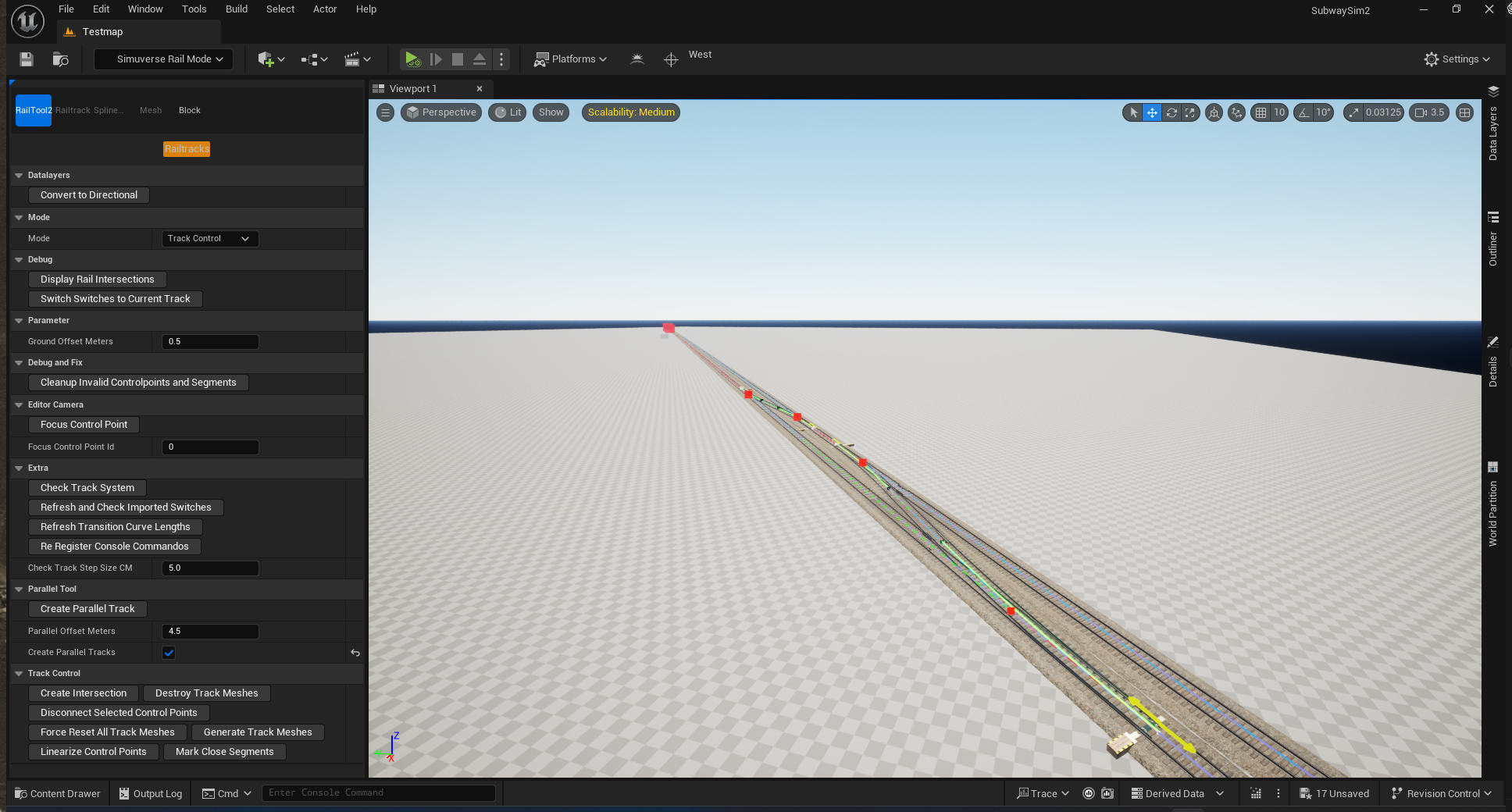
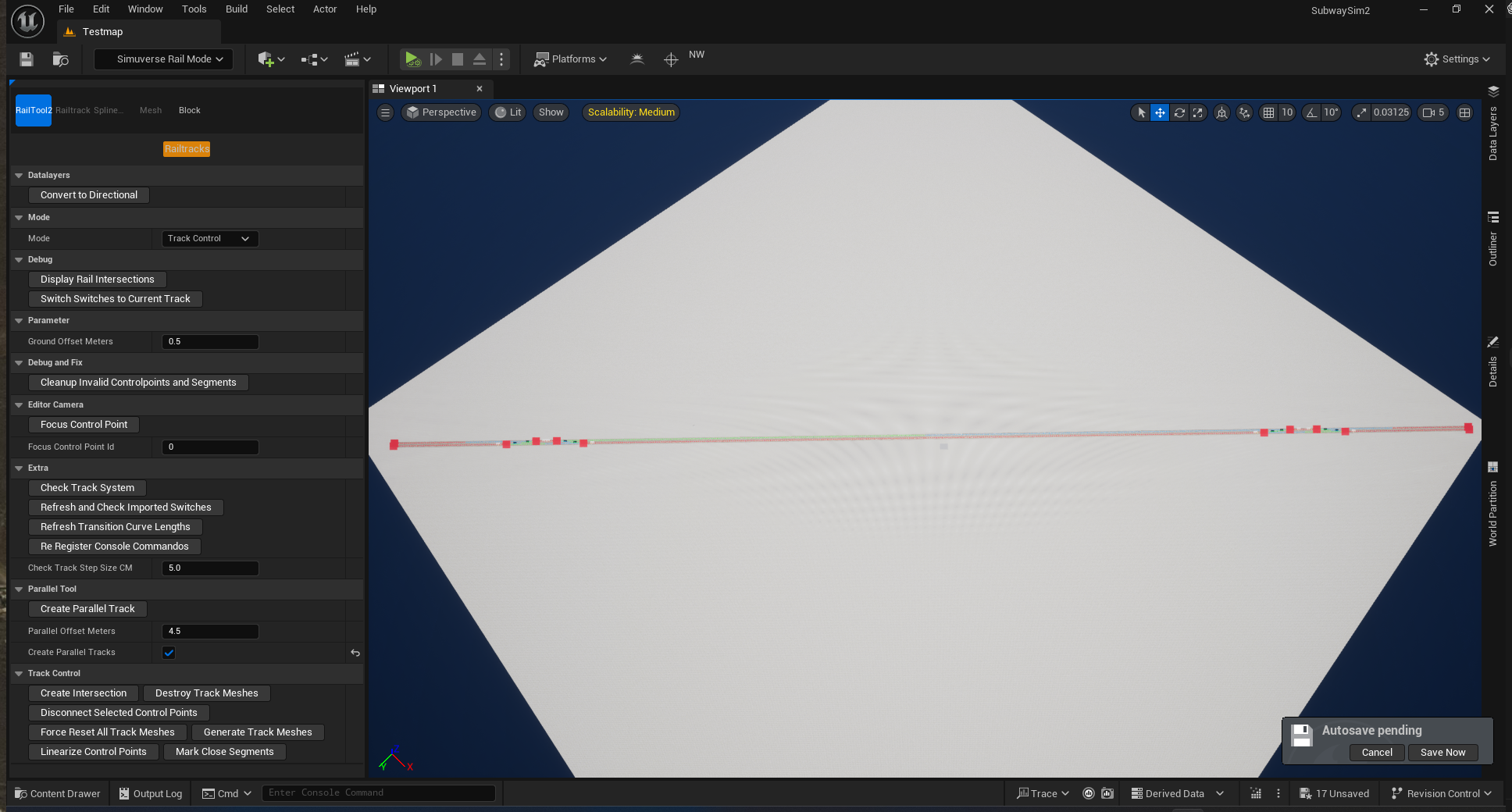
Building the Main Line
We start by creating a double-track main line on the test map that was created earlier in:
At both ends of the route, we create crossovers so trains can:
- switch from the left track to the right track
- switch from the right track to the left track
These crossovers are essential later for AI routing and timetable planning.
Creating a Depot Connection
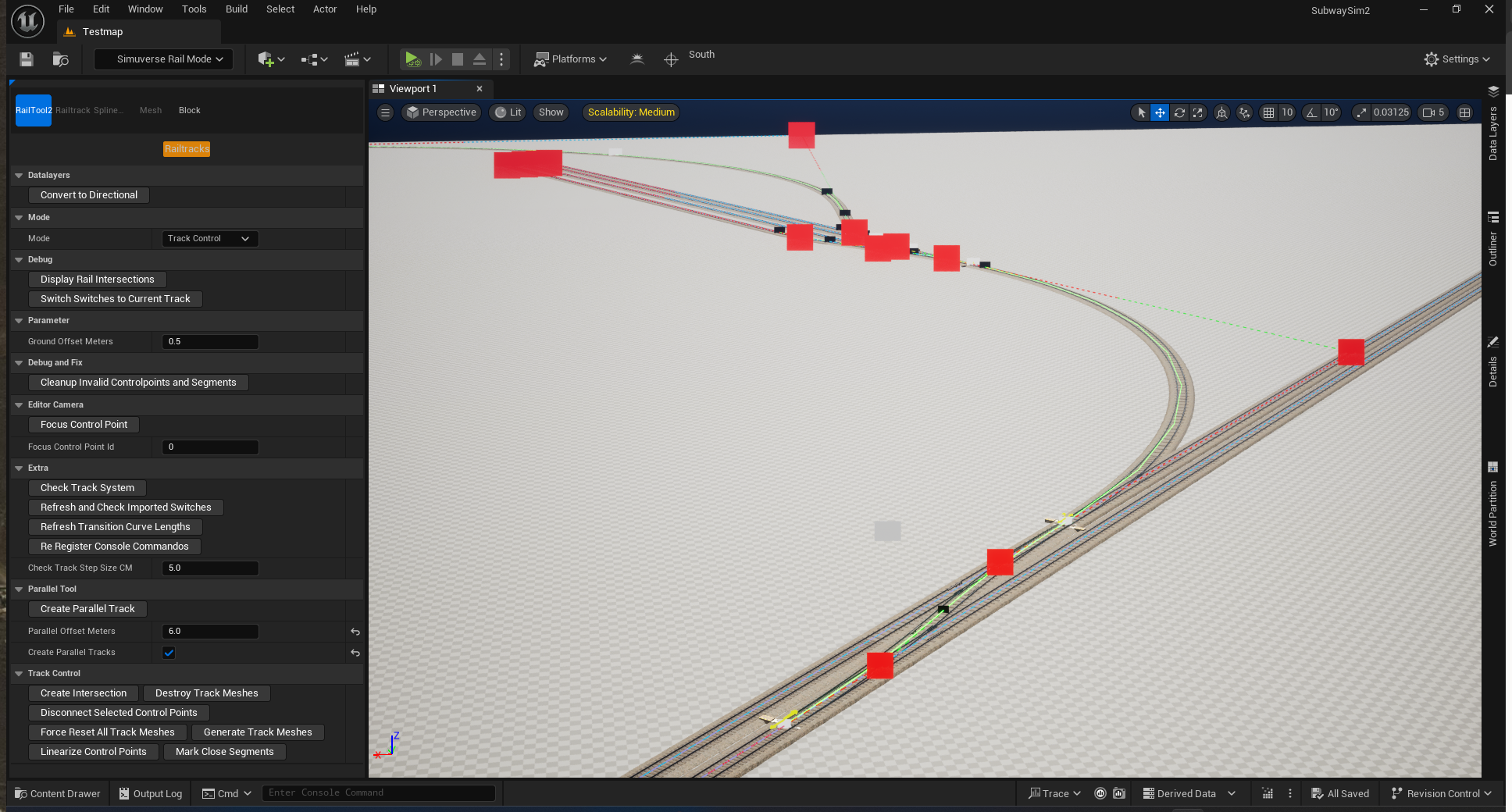
Once the straight main line is finished, we add a small depot area where trains can be stored.
To do this, we go to the middle of the main line and create another crossover between both tracks. This crossover will serve as the only access point to the depot.
We intentionally design the depot so that:
- trains can enter the depot only from one direction
This is a deliberate constraint and will later help demonstrate dispatching and routing logic.
Adding a Test / Inspection Track
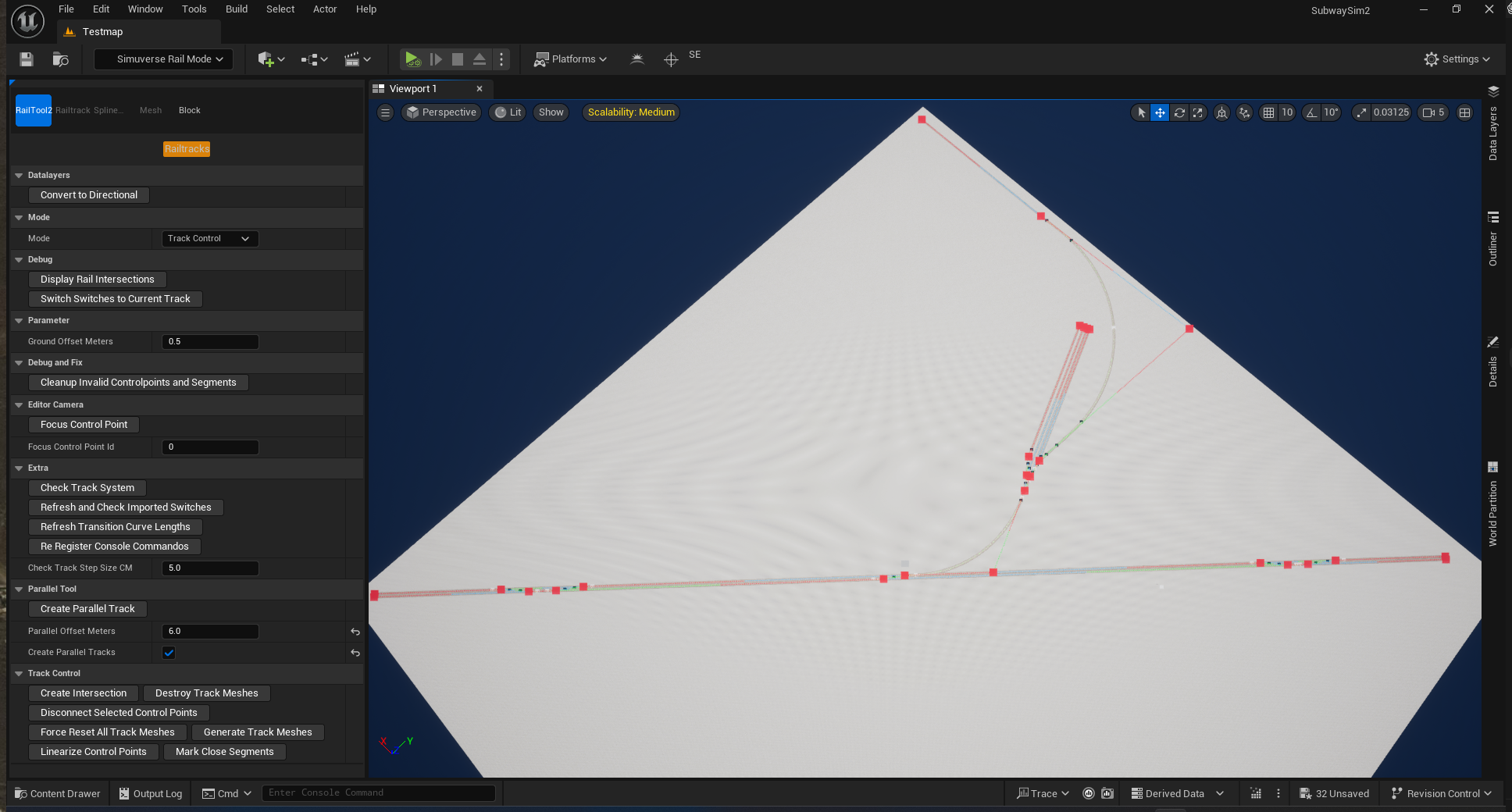
At the depot, we add one additional long track that runs past the depot on the outside.
This track can be used as:
- a test track for vehicles
- an inspection track for debugging
- a safe place to spawn and test new vehicles without blocking the main line
Important Note
⚠️ Data Layers must be set up while laying tracks
When building the track layout, it is essential to also create and assign the correct Data Layers at the same time.
In particular, make sure to:
- place and assign third rail (power rail) Data Layers
- place and assign tunnel Data Layers where applicable
These Data Layers are not just visual elements. They are required for:
- correct power supply logic
- tunnel-specific lighting and environment behavior
- proper interaction with vehicles and systems later in development
Adding or fixing missing Data Layers after the track layout is finished can be very time-consuming and error-prone.
Before continuing, make sure you have read and followed the instructions in:
Only continue once all required Data Layers are correctly set up along the entire route.
Signals and Speed Limits
Every map requires signals in order to spawn and operate trains correctly. It is not possible to place or spawn a train on a track unless there is a valid signal in front of and behind the train.
This rule is mandatory and must always be respected.
Signal Assets
All required signal assets can be found in the SubwaySim2_Modding plugin:
Path:
SubwaySim2_Modding / Infrastructure / Signals
Assets from SubwaySim2_Modding may always be used directly in your maps.
For details on why this is allowed, see:
Placing Buffer Stops and Signals
For every track end and exit, the following elements must be placed:
Buffer Stops
- Blueprint: BP_BufferStop
- Must be placed at every dead-end track
Signals
- Blueprint: BP_MS_SGRYSYG
- Must be placed at every exit and entry point of a track
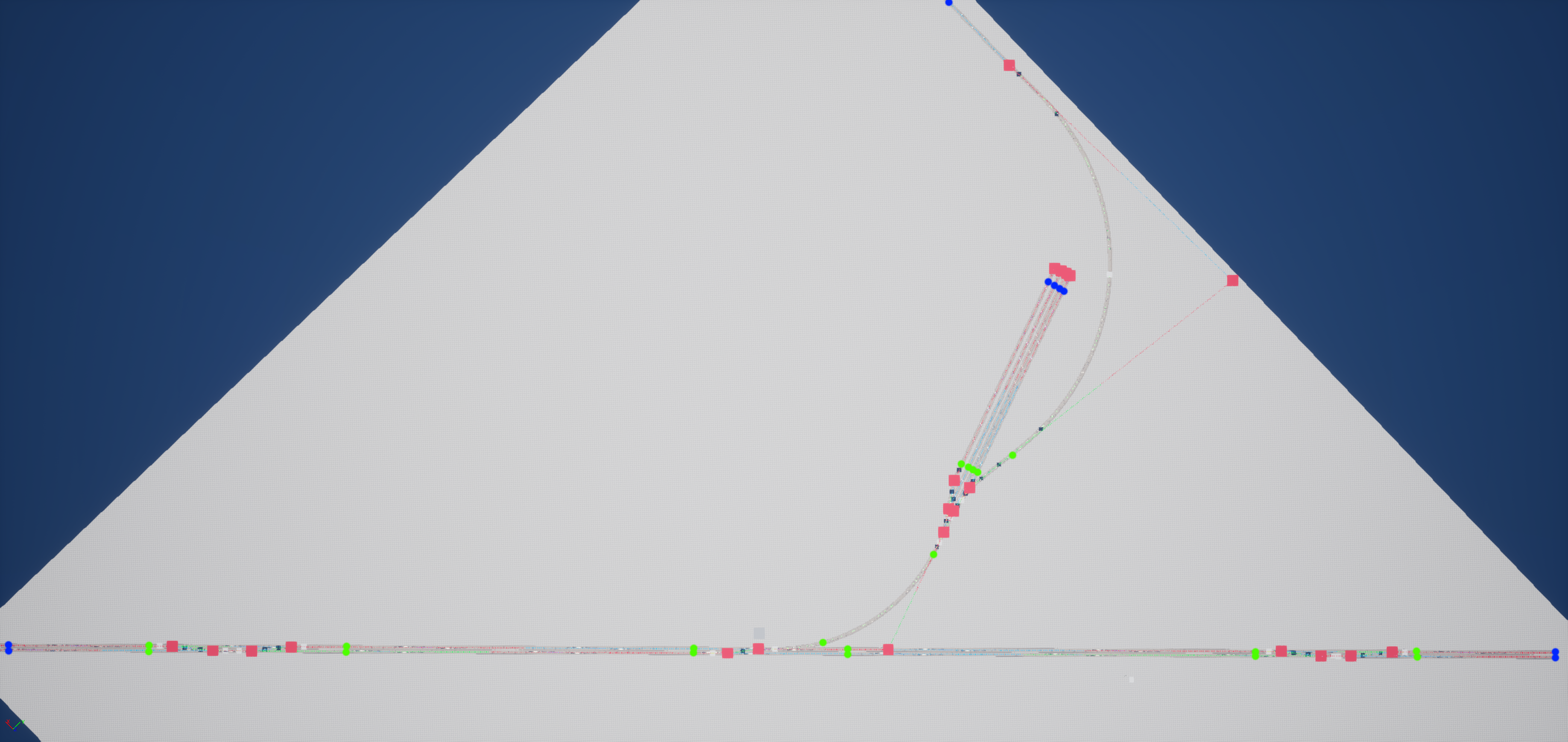
(Here an overview image is shown with:
- Green markers = Signals
- Blue markers = Buffer Stops)
Signal Speed Limits
Important Note
Speed limits and signal behavior in SubwaySim 2 follow the Berlin U-Bahn signaling logic.
This means:
- Speed limits apply immediately at the signal
- There is no delayed enforcement after passing the signal
Setting Speed Limits
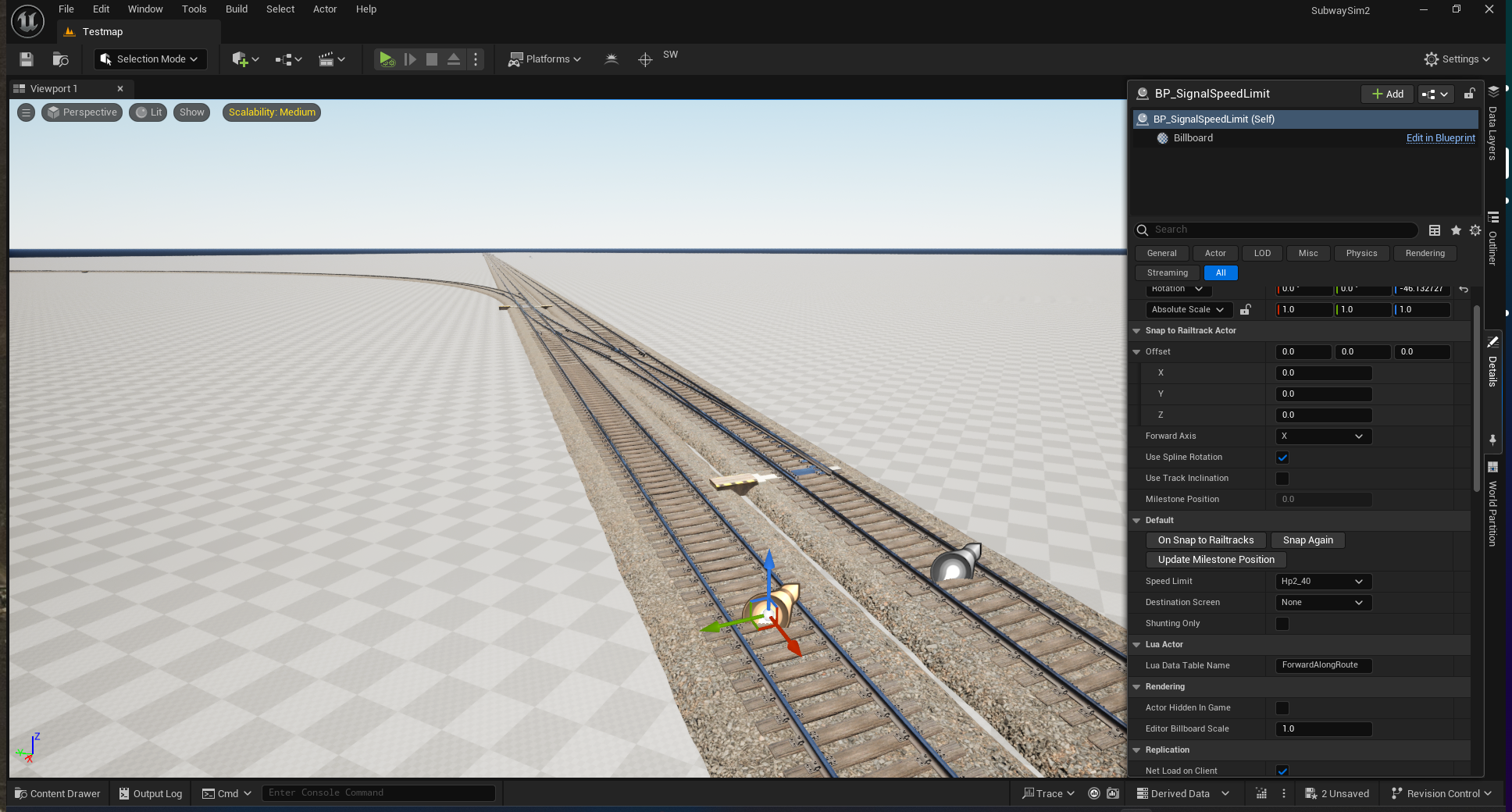
After all signals are placed, define how fast trains are allowed to travel using:
- BP_SignalSpeedLimit
This blueprint is placed:
- at the point where the train is expected to pass
- in the direction of travel
Using this blueprint, you can:
- define a speed limit
- optionally add additional indicators (e.g. track number indicators)
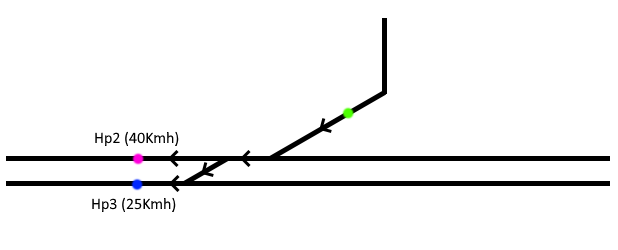
- Green markers = Signals
- Pink markers = Signal Speed Limit (40 km/h)
- Blue markers = Signal Speed Limit (25 km/h)
After placing buffer stops, signals, and speed limits, the map is prepared from a signaling perspective.
Station Definitions
Station Definitions are a mandatory part of every map that should support AI trains.
Blueprint:
SubwaySim2_Modding / GameFramework / RailwaySystem / **BP_StationDefinition**
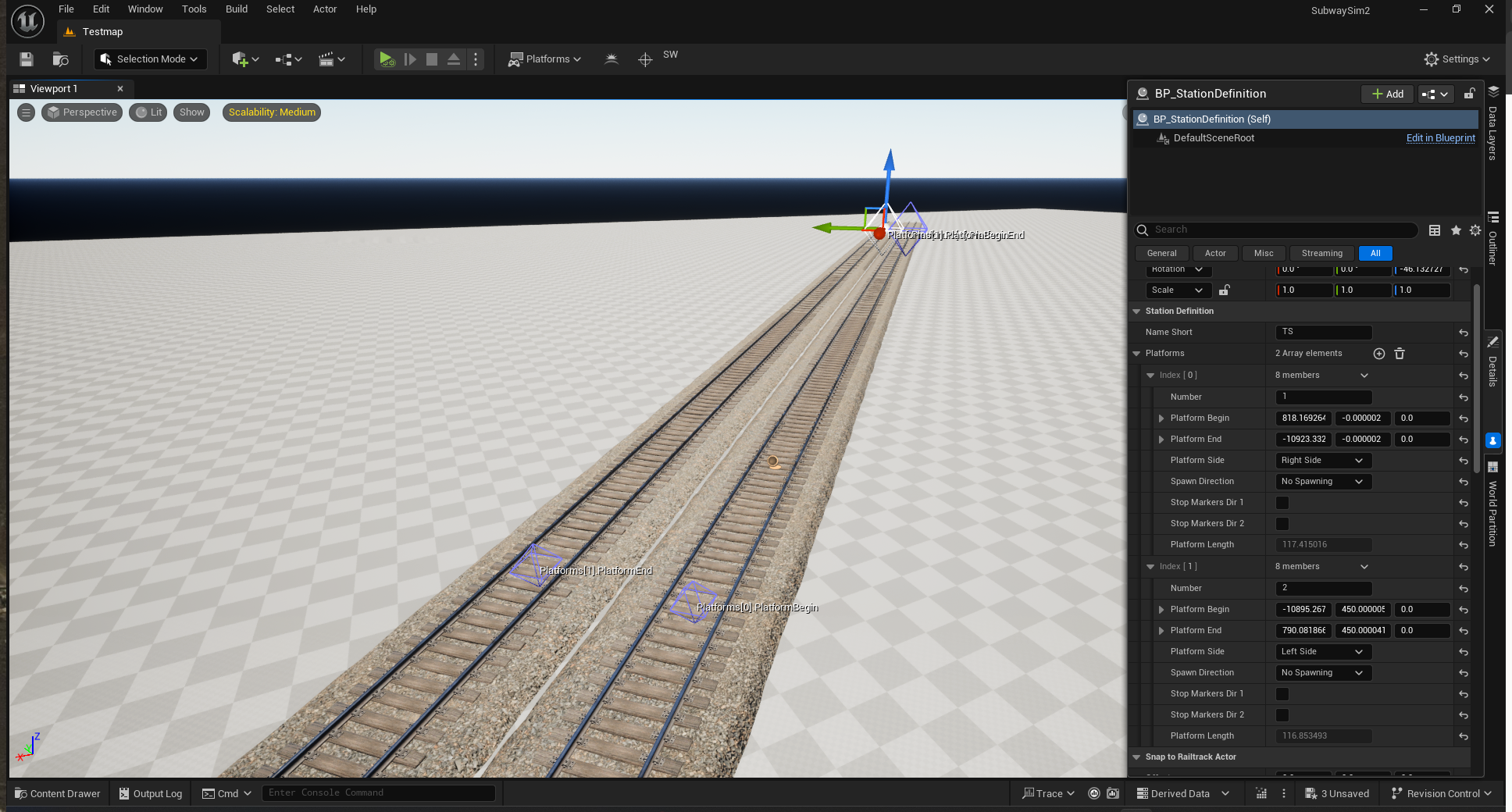
A BP_StationDefinition must be placed once per station. Inside this Blueprint, all platforms belonging to that station are defined.
In our example map we will need:
- Three Station Definitions for passenger stations
- One Station Definition for the depot
Placing a Station Definition
Drag BP_StationDefinition onto the track. The Blueprint will automatically snap to the rail.
Repeat this step for every station and the depot.
Station Definition Settings
Select the placed BP_StationDefinition and open the Details panel.
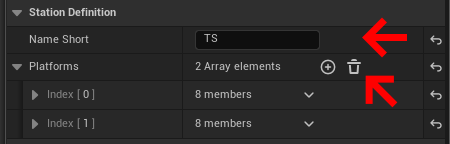
Inside the Station Definition section you will find:
- Name Short
Short station identifier (station code).
  Example:
  Warschauer Straße → `WA`
  TestStation → `TS`
Defining Platforms
Each station can have one or more platforms.
To add a platform:
- Click the + button in the Platforms array
Two markers will appear:
- Platform Begin
- Platform End
Placement rules:
- Platform End points towards the buffer stop / track end
- Platform Begin points towards the open track
- IMPORTANT:
The rotation of Begin and End markers must be consistent across the entire map (all platforms must follow the same direction logic)
Platform Properties
| Property | Description |
|---|---|
| Number | Platform number. Referenced later in Lua and timetables. |
| Platform Begin | XYZ coordinates of the platform start marker. |
| Platform End | XYZ coordinates of the platform end marker. |
| Platform Side | Platform side relative to track direction (Begin → End). Options: No Platform, Left, Right. |
| Spawn Direction | Currently not relevant. Used for passenger spawning logic. |
| Stop Markers Dir 1 | Automatically generates stop markers for direction 1. |
| Stop Markers Dir 2 | Automatically generates stop markers for direction 2. |
| Platform Length | Auto-calculated platform length. Important for AI stopping accuracy and Lua logic. |
Finalizing Station Setup
Configure all stations until the station layout matches the intended design.
Repeat this process for:
- The opposite terminus
- The intermediate station near the depot
- The depot itself
Once Station Definitions are finished, the map is ready for:
- AI train spawning
- Timetables
- Station-based routing
Map.lua Explained (TestMap Example)
This page explains the structure of a Map.lua file for SubwaySim 2. It follows the file from top to bottom and explains each section in detail.
The Map.lua consists of two major parts:
- Map Registration (ContentManager DataTable)
- Runtime Map Logic (Lua class based on BaseMap)
Complete Map.lua File
--
--
-- SubwaySim2
-- Module TestMap.lua
--
-- Map file for SDK TestMap
--
--
-- Author:	SDK User
-- Date:	__/__/____
--
---@class TestMap : TestMap, BaseMap
TestMap = Class("TestMap", TestMap, BaseMap);

---@type SSB_Map_DataTable
local TestMap_DataTable = {
	contentType		= "map",
	contentName		= "TestMap",
	class			= TestMap,
	levelName		= "Testmap",
	author			= "$GameDeveloper",

	title			= "SDK TestMap",
	subtitle		= "This could be your text",
	description		= "This is a test map that demonstrates how to use the Modding SDK. You can also use it for testing your own vehicles.",
	previewFilename = "/SubwaySim2_Core/UI/MainMenu/Backgrounds/CityBerlin.CityBerlin",
};
g_contentManager:addContent(TestMap_DataTable);

--- Creates a new instance of this class
---@return TestMap
function TestMap:new()
	self = TestMap:emptyNew();

	self.levelName		= "Testmap";
	self.displayName	= "SDK TestMap";

	-- latitude and longitude of Berlin's city center
	self.latitude		= 52.518611;
	self.longitude		= 13.408333;
	-- UTC+1
	self.timezone		= 1;

	self:loadStations();
	self:loadTimetables();
	self:loadCareerMode();

	EventManager.callModListeners("onMapCreated", self);

	return self;
end;

--- Event to load any additionally required level instances
function TestMap:loadLevelInstances()
	assert(GameplayStatics.loadLevelInstance("SubwaySim2_Environment", Vector3.zero, Vector3.zero), "Failed to load a part of the level");
end;

--- Loads the station definitions for this map
function TestMap:loadStations()
	---@type table<string, Station>
	self.stations = {}

	self.stations.TS = Station:new("TS", "TestStation")
		:addSpawnPlatform("1", 115, 2)
		:addSpawnPlatform("2", 115, 2)

	self.stations.TSD = Station:new("TSD", "TestStation Depot")

	self.stations.TSA = Station:new("TSA", "TestStation Anfang")
		:addSpawnPlatform("1", 110, 1)
		:addSpawnPlatform("2", 110, 1)

	self.stations.DP = Station:new("DP", "Depot")
		:addSpawnPlatform("51", 220, 2)
		:addSpawnPlatform("52", 220, 2)
		:addSpawnPlatform("53", 220, 2)
		:addSpawnPlatform("54", 220, 2)
		:addSpawnPlatform("60", 110, 2)

end

--- Loads the default timetables for this map
function TestMap:loadTimetables()

	---@type Timetable[]
	self.timetables = {};

	-- Direction 1 (TS -> TSA)
	self.TestLine_Dir1 = Timetable:new("U1", 0)
		:addTrainComposition("Berlin_HK_1x", 0.5)
		:addTrainComposition("Berlin_HK_2x")
		:addTrainComposition("Berlin_A3L92_1x", 0)
		:addTrainComposition("Berlin_A3L92_2x", 0)
		:addTrainComposition("Berlin_A3L92_3x", 0.5)
		:addTrainComposition("Berlin_A3L92_4x")
		:addStop({
			station = self.stations.TS,
			platform = 2,
			departure = 0,
			speedLimit = 70,
			routeSettingMaxETA = 0.5, -- Fahrstraße stellt sich erst 0.5 Minuten vor Abfahrt
		})
		:addStop({
			station = self.stations.TSD,
			platform = 2,
			departure = 0,
			speedLimit = 70,
		})
		:addStop({
			station = self.stations.TSA,
			platform = 1,
			departure = 0,
			speedLimit = 70,
			altPlatform = { "2",},
		})

	-- Direction 2 (TSA -> TS)
	self.TestLine_Dir2 = Timetable:new("U1", 0)
		:addTrainComposition("Berlin_HK_1x", 0.5)
		:addTrainComposition("Berlin_HK_2x")
		:addTrainComposition("Berlin_A3L92_1x", 0)
		:addTrainComposition("Berlin_A3L92_2x", 0)
		:addTrainComposition("Berlin_A3L92_3x", 0.5)
		:addTrainComposition("Berlin_A3L92_4x")
		:addStop({
			station = self.stations.TSA,
			platform = 1,
			departure = 0,
			speedLimit = 70,
			routeSettingMaxETA = 0.5, -- Fahrstraße stellt sich erst 0.5 Minuten vor Abfahrt
		})
		:addStop({
			station = self.stations.TSD,
			platform = 1,
			departure = 0,
			speedLimit = 70,
		})
		:addStop({
			station = self.stations.TS,
			platform = 2,
			departure = 0,
			speedLimit = 70,
			altPlatform = { "1",},
		})

	-- List of templates by line, then by direction
	---@type Timetable[][]
	self.templatesByLine = {
		[1] = {
			[1] = self.TestLine_Dir1,
			[2] = self.TestLine_Dir2,
		},
	};

	---@type table<1|2, Timetable[]>
	self.templatesByDirection = {
		[1] = {
			self.TestLine_Dir1,
		},
		[2] = {
			self.TestLine_Dir2,
		},
	};

	local DM = DayMask;

	-- Repeating interval example
	TableUtil.insertList(self.timetables, self.TestLine_Dir1:clone(daytime(04, 30)):repeatUntil(daytime(23, 30), 10));
	TableUtil.insertList(self.timetables, self.TestLine_Dir2:clone(daytime(04, 35)):repeatUntil(daytime(23, 35), 10));

	---@type table<string, Depot_DepotSpace[]>
	self.depots = {
	};

	---@type table<Station, ControlCenter_DispatchingStrategy[]>
	self.dispatchingStrategies = {

		-- Turnaround logic at TS
 		[self.stations.TS] = {
			{
				sourceStation = self.stations.TS,
				targetStation = self.stations.TS,
				sourcePlatforms = { "1", "2" },
				targetPlatforms = { "1", "2" },
				replaceFirstPlatform = true,
				keepLine = false,
				minLayover = 4,
			},
		},

		-- Turnaround logic at TSA
		[self.stations.TSA] = {
			{
				sourceStation = self.stations.TSA,
				targetStation = self.stations.TSA,
				sourcePlatforms = { "1", "2" },
				targetPlatforms = { "1", "2" },
				replaceFirstPlatform = true,
				keepLine = false,
				minLayover = 4,
			},
		},
	};
end;

--- Initializes data for career mode
function TestMap:loadCareerMode()
end;

--- Registers all valid timetables to the given `controlCenter` instance
---@param controlCenter ControlCenter
function TestMap:registerTimetables(controlCenter)
	controlCenter:setStationList(self.stations);
	controlCenter:setTimetableList(self.timetables, self.dispatchingStrategies, self.depots);
end;
1) Map Registration (ContentManager DataTable)
The DataTable registers the map in the ContentManager. Without it the map will not appear in the map selection menu and cannot be loaded.
DataTable Fields
| Field | Description |
|---|---|
| contentType | Defines the type of content. Must be `“map”`. |
| contentName | Unique internal identifier for this map across all mods. |
| class | Reference to the Lua map class that provides runtime logic. |
| levelName | Unreal level (.umap) name that will be loaded. Must match exactly. |
| author | Author metadata (UI / debugging). |
| title | Map title shown in the selection menu. |
| subtitle | Optional subtitle below the title. |
| description | Longer description shown in UI. |
| previewFilename | Path to the preview image used in the main menu. |
Registering the DataTable
After the table is defined, it must be registered:
g_contentManager:addContent(TestMap_DataTable);
If this call is missing, the map is not registered and will never load.
2) Runtime Map Class (BaseMap)
The runtime class is responsible for everything that happens when the map is loaded:
- defining stations and their platforms
- defining timetables and AI services
- configuring dispatching / turnaround rules
- optional career mode setup
Class Definition
TestMap = Class("TestMap", TestMap, BaseMap);
This creates a new map class inheriting from `BaseMap`.
3) Constructor (new)
The constructor creates the map instance and prepares the runtime data.
Core Properties
| Property | Description |
|---|---|
| self.levelName | The Unreal level to load (must match DataTable `levelName`). |
| self.displayName | Internal display name used at runtime. |
| self.latitude | Used for sun position and environment lighting. |
| self.longitude | Used for sun position and environment lighting. |
| self.timezone | Timezone offset for day/time simulation (UTC+1 = 1). |
Loading Runtime Data
The order matters:
- `loadStations()` must run first (timetables reference stations)
- `loadTimetables()` uses station references
- `loadCareerMode()` is optional
Mod Event Hook
EventManager.callModListeners("onMapCreated", self);
This allows other mods or systems to react when the map instance is created.
4) loadLevelInstances() (Optional)
Maps can optionally load additional level instances (e.g. a city environment).
What the Example Does
GameplayStatics.loadLevelInstance("SubwaySim2_Environment", Vector3.zero, Vector3.zero)
`assert(…)` stops execution early if loading fails, which helps during development.
5) Stations (Derived from BP_StationDefinition)
Stations defined in `loadStations()` must match BP_StationDefinition actors placed in the Unreal Editor.
5.1 How Lua Stations Connect to BP_StationDefinition
The connection is made via the station short name:
- In Unreal: BP_StationDefinition → Name Short
- In Lua: `Station:new(“TS”, “TestStation”)`
If the short name does not match exactly:
- stations may not register correctly
- AI routing can fail
- timetable stops may not resolve
5.2 Station Table
Stations are stored as a keyed table:
---@type table<string, Station>
self.stations = {}
The key is usually identical to the short name:
- `self.stations.TS`
- `self.stations.TSA`
- `self.stations.DP`
5.3 Station:new()
Creating a station:
Station:new("TS", "TestStation")
| Parameter | Description |
|---|---|
| `“TS”` | Short name (station code). Must match BP_StationDefinition Name Short. |
| `“TestStation”` | Display name shown in UI. |
5.4 addSpawnPlatform()
Spawn platforms define where trains may spawn for:
- AI traffic
- player spawning (depending on map setup)
Example:
:addSpawnPlatform("1", 115, 2)
| Parameter | Description |
|---|---|
| `“1”` | Platform number as defined in BP_StationDefinition platform array. |
| `115` | Max allowed train length in meters for spawning at this platform. |
| `2` | Spawn direction on the track (orientation). Must match your platform Begin/End marker direction logic. |
⚠️ Important Platform numbers are not “free”. They must match exactly the platform configuration inside BP_StationDefinition.
5.5 Example: Depot Platforms
The depot station `DP` uses multiple platform numbers:
- 51–54
- 60
This is a common pattern to represent multiple depot tracks.
6) Timetables
Timetables define:
- which trains spawn (compositions)
- what route they drive (stops)
- on which platforms they stop
- how often services repeat
6.1 Timetable:new()
A timetable template is created with:
Timetable:new("U1", 0)
| Parameter | Description |
|---|---|
| `“U1”` | Line name used for UI and routing logic. |
| `0` | Variant / index value (map-specific usage). |
Templates are usually created per direction:
- Direction 1: TS → TSA
- Direction 2: TSA → TS
6.2 Train Compositions
(Replace with your corrected version – you already asked for that)
6.3 addStop() (Route Definition)
Stops define the actual route of a timetable. Each stop is a table passed into `addStop({ … })`.
Example:
:addStop({
	station = self.stations.TS,
	platform = 2,
	departure = 0,
	speedLimit = 70,
	routeSettingMaxETA = 0.5,
})
| Field | Type | Description |
|---|---|---|
| station | Station | Reference to a station defined in `loadStations()`. |
| platform | number | Platform number the train uses at this station. Must exist in BP_StationDefinition. |
| departure | number | Minutes after service start/spawn when the train departs this stop. |
| speedLimit | number | Speed limit applied after departing this stop (signal logic dependent). |
| routeSettingMaxETA | number (optional) | How many minutes before departure the route (Fahrstraße) should be requested/set. |
| altPlatform | table<string> (optional) | Alternative platforms that may be used if the primary platform is unavailable. |
6.4 altPlatform (Alternative Platforms)
Example:
altPlatform = { "2", }
⚠️ Use string values (`“1”`, `“2”`) because platform identifiers are typically handled as strings in routing/dispatch contexts.
This allows AI to select another platform if:
- the preferred platform is blocked
- dispatching assigns an alternative
6.5 routeSettingMaxETA (Route Pre-Setting)
Example:
routeSettingMaxETA = 0.5
Meaning:
- the route will be requested/updated roughly 0.5 minutes before departure
This can help avoid early route locking and improves traffic handling at busy stations.
6.6 clone() + repeatUntil() (Creating Services)
A timetable template does not spawn trains by itself. It must be cloned into real timetable entries.
Example:
TableUtil.insertList(
	self.timetables,
	self.TestLine_Dir1:clone(daytime(04, 30)):repeatUntil(daytime(23, 30), 10)
);
| Call | Description |
|---|---|
| clone(daytime(HH, MM)) | Creates a timetable entry starting at a given time. |
| repeatUntil(daytime(HH, MM), interval) | Repeats the entry every X minutes until the end time. |
| TableUtil.insertList(list, result) | Inserts the generated entries into `self.timetables`. |
Result:
- a full day service pattern is generated automatically
6.7 templatesByLine / templatesByDirection
These tables store template references for later use (UI, dispatching helpers, debugging).
| Table | Structure | Purpose | |
|---|---|---|---|
| templatesByLine | Timetable[][] | Group templates by line, then direction index. | |
| templatesByDirection | table<1 | 2, Timetable[]> | Quick access to templates by direction. |
7) Depots and Dispatching
This section defines:
- depot storage spaces (optional)
- turnaround / dispatch behavior at stations
7.1 Depots (self.depots)
---@type table<string, Depot_DepotSpace[]>
self.depots = {}
In this example the table is empty. It can later be filled with depot spaces and rules.
7.2 Dispatching Strategies (self.dispatchingStrategies)
Dispatching strategies tell the ControlCenter how trains should be handled when they reach a station:
- turnaround
- reuse
- platform reassignment
Structure:
---@type table<Station, ControlCenter_DispatchingStrategy[]>
self.dispatchingStrategies = {
	[self.stations.TS]  = { ... },
	[self.stations.TSA] = { ... },
}
Each station maps to a list of strategy entries.
7.3 Dispatching Strategy Fields
Example strategy:
{
	sourceStation = self.stations.TS,
	targetStation = self.stations.TS,
	sourcePlatforms = { "1", "2" },
	targetPlatforms = { "1", "2" },
	replaceFirstPlatform = true,
	keepLine = false,
	minLayover = 4,
}
| Field | Type | Description |
|---|---|---|
| sourceStation | Station | Station where the train arrives. |
| targetStation | Station | Station where the train should be dispatched to next. For turnaround this is the same station. |
| sourcePlatforms | table<string> | Platforms where arriving trains are accepted. |
| targetPlatforms | table<string> | Platforms that may be used for the next departure. |
| replaceFirstPlatform | boolean | Allows the first platform of the next service to be replaced (platform reassignment). |
| keepLine | boolean | If true, keeps the line association. If false, line may be reset/changed by dispatch logic. |
| minLayover | number | Minimum layover time (minutes) before the next departure. |
8) Career Mode (Optional)
`loadCareerMode()` is optional and currently empty.
This is where career mode related data can be initialized later.
9) Registering Stations and Timetables
The final step is registering runtime data with the ControlCenter:
controlCenter:setStationList(self.stations);
controlCenter:setTimetableList(self.timetables, self.dispatchingStrategies, self.depots);
| Call | Description |
|---|---|
| setStationList | Registers all stations for routing, UI and spawning logic. |
| setTimetableList | Registers AI services plus dispatching and depot logic. |
If this function is missing or incomplete:
- AI traffic will not work
- stations may not be recognized for routing
Next Step: Creating the Map.lua
At this point, the map layout and all required level elements are prepared:
- tracks and crossovers are in place
- signals and speed limits are configured
- station definitions are placed and finalized
The next step is defining the runtime logic of the map.
This is done in the Map.lua, where you will:
- register the map so it appears in the menu
- link the Unreal level to the map
- define stations and platforms for AI and player spawning
- create AI timetables and services
- configure dispatching and depot logic
Continue with:
© 2026 Simuverse Interactive · SubwaySim 2 Modding Wiki
All trademarks and registered trademarks are the property of their respective owners. This Wiki is provided for documentation and modding purposes only.